Wednesday, 28 September 2022

How To Get An INVITE code from HTB(hack the box)

 how to get an invite code from HTB?

warning- spoilers ahead if you wanna hack it yourself don’t go down.

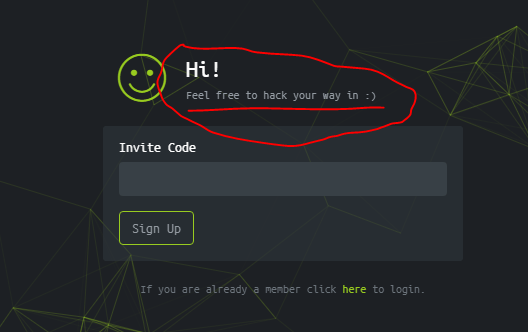
you might be on this page  https://www.hackthebox.eu/invite and wondering that how will you get an invite code? as you can see that there is something written over input.

like this:

it means, we have to hack the website to get the code:

step 1

go to the inspect elements by pressing CTRL+SHIFT+I. you can see js/inviteapi.min.js parameter that seems interesting.

step 2

go to the https://www.hackthebox.eu/js/inviteapi.min.js and look if there is anything to do with. you will see that there is makeInviteCode. we will use it in invite page console.

step 3

go back to invite page and open inspect elements and go to the console and just write makeInviteCode there and hit ENTER. you will see some kinda encoded code.

step 4

it is base64 encoded. go to https://www.base64decode.org/

and decode it easily. it will give you some parameter that will give you invite code.

step 5

you can’t get anything by make get a request to https://www.hackthebox.eu/api/invite/generate. so we will make a post request using curl.

type this command in your terminal

curl -XPOST <https://www.hackthebox.eu/api/invite/generate>

and you will get the invite code. but remember, a particular invite-code will work only for a particular IP. so you won’t be able to use anyone’s code.


thanks for visiting

Friday, 23 September 2022

Ethical Hacking - What is Reconnaissance

 Information Gathering and getting to know the target systems is the first process in ethical hacking. Reconnaissance is a set of processes and techniques (Footprinting, Scanning & Enumeration) used to covertly discover and collect information about a target system.

During reconnaissance, an ethical hacker attempts to gather as much information about a target system as possible, following the seven steps listed below −

  • Gather initial information
  • Determine the network range
  • Identify active machines
  • Discover open ports and access points
  • Fingerprint the operating system
  • Uncover services on ports
  • Map the network

We will discuss in detail all these steps in the subsequent chapters of this tutorial. Reconnaissance takes place in two parts − Active Reconnaissance and Passive Reconnaissance.

Active Reconnaissance

In this process, you will directly interact with the computer system to gain information. This information can be relevant and accurate. But there is a risk of getting detected if you are planning active reconnaissance without permission. If you are detected, then system admin can take severe action against you and trail your subsequent activities.

Passive Reconnaissance

In this process, you will not be directly connected to a computer system. This process is used to gather essential information without ever interacting with the target systems.

Thursday, 22 September 2022

Software Development Life Cycle (SDLC)

 A software life cycle model (also termed process model) is a pictorial and diagrammatic representation of the software life cycle. A life cycle model represents all the methods required to make a software product transit through its life cycle stages. It also captures the structure in which these methods are to be undertaken.

In other words, a life cycle model maps the various activities performed on a software product from its inception to retirement. Different life cycle models may plan the necessary development activities to phases in different ways. Thus, no element which life cycle model is followed, the essential activities are contained in all life cycle models though the action may be carried out in distinct orders in different life cycle models. During any life cycle stage, more than one activity may also be carried out.

The stages of SDLC are as follows:

Stage1: Planning and requirement analysis

Requirement Analysis is the most important and necessary stage in SDLC.

The senior members of the team perform it with inputs from all the stakeholders and domain experts or SMEs in the industry.

Planning for the quality assurance requirements and identifications of the risks associated with the projects is also done at this stage.

Business analyst and Project organizer set up a meeting with the client to gather all the data like what the customer wants to build, who will be the end user, what is the objective

Stage2: Defining Requirements

Once the requirement analysis is done, the next stage is to certainly represent and document the software requirements and get them accepted from the project stakeholders.

This is accomplished through "SRS"- Software Requirement Specification document which contains all the product requirements to be constructed and developed during the project life cycle.

Stage3: Designing the Software

The next phase is about to bring down all the knowledge of requirements, analysis, and design of the software project. This phase is the product of the last two, like inputs from the customer and requirement gathering.

Stage4: Developing the project

In this phase of SDLC, the actual development begins, and the programming is built. The implementation of design begins concerning writing code. Developers have to follow the coding guidelines described by their management and programming tools like compilers, interpreters, debuggers, etc. are used to develop and implement the code.

Stage5: Testing

After the code is generated, it is tested against the requirements to make sure that the products are solving the needs addressed and gathered during the requirements stage.

During this stage, unit testing, integration testing, system testing, acceptance testing are done.

Stage3: Designing the Software

The next phase is about to bring down all the knowledge of requirements, analysis, and design of the software project. This phase is the product of the last two, like inputs from the customer and requirement gathering.


Stage5: Testing

After the code is generated, it is tested against the requirements to make sure that the products are solving the needs addressed and gathered during the requirements stage.

Stage6: Deployment

Once the software is certified, and no bugs or errors are stated, then it is deployed.

Then based on the assessment, the software may be released as it is or with suggested enhancement in the object segment.

After the software is deployed, then its maintenance begins.

Stage7: Maintenance

Once when the client starts using the developed systems, then the real issues come up and requirements to be solved from time to time.

This procedure where the care is taken for the developed product is known as maintenance.
Wednesday, 21 September 2022

What is Spiral Model

 The spiral model, initially proposed by Boehm, is an evolutionary software process model that couples the iterative feature of prototyping with the controlled and systematic aspects of the linear sequential model. It implements the potential for rapid development of new versions of the software. Using the spiral model, the software is developed in a series of incremental releases. During the early iterations, the additional release may be a paper model or prototype. During later iterations, more and more complete versions of the engineered system are produced.


Each cycle in the spiral is divided into four parts:

Objective setting: Each cycle in the spiral starts with the identification of purpose for that cycle, the various alternatives that are possible for achieving the targets, and the constraints that exists.

Risk Assessment and reduction: The next phase in the cycle is to calculate these various alternatives based on the goals and constraints. The focus of evaluation in this stage is located on the risk perception for the project.

Development and validation: The next phase is to develop strategies that resolve uncertainties and risks. This process may include activities such as benchmarking, simulation, and prototyping.

Planning: Finally, the next step is planned. The project is reviewed, and a choice made whether to continue with a further period of the spiral. If it is determined to keep, plans are drawn up for the next step of the project.

The development phase depends on the remaining risks. For example, if performance or user-interface risks are treated more essential than the program development risks, the next phase may be an evolutionary development that includes developing a more detailed prototype for solving the risks.

The risk-driven feature of the spiral model allows it to accommodate any mixture of a specification-oriented, prototype-oriented, simulation-oriented, or another type of approach. An essential element of the model is that each period of the spiral is completed by a review that includes all the products developed during that cycle, including plans for the next cycle. The spiral model works for development as well as enhancement projects.

Sunday, 11 September 2022

What Is Waterfall model

 Winston Royce introduced the Waterfall Model in 1970.This model has five phases: Requirements analysis and specification, design, implementation, and unit testing, integration and system testing, and operation and maintenance. The steps always follow in this order and do not overlap. The developer must complete every phase before the next phase begins. This model is named "Waterfall Model", because its diagrammatic representation resembles a cascade of waterfalls.

1. Requirements analysis and specification phase: The aim of this phase is to understand the exact requirements of the customer and to document them properly. Both the customer and the software developer work together so as to document all the functions, performance, and interfacing requirement of the software. It describes the "what" of the system to be produced and not "how."In this phase, a large document called Software Requirement Specification (SRS) document is created which contained a detailed description of what the system will do in the common language.

2. Design Phase: This phase aims to transform the requirements gathered in the SRS into a suitable form which permits further coding in a programming language. It defines the overall software architecture together with high level and detailed design. All this work is documented as a Software Design Document (SDD).

3. Implementation and unit testing: During this phase, design is implemented. If the SDD is complete, the implementation or coding phase proceeds smoothly, because all the information needed by software developers is contained in the SDD.

4. Integration and System Testing: This phase is highly crucial as the quality of the end product is determined by the effectiveness of the testing carried out. The better output will lead to satisfied customers, lower maintenance costs, and accurate results. Unit testing determines the efficiency of individual modules. However, in this phase, the modules are tested for their interactions with each other and with the system.

5. Operation and maintenance phase: Maintenance is the task performed by every user once the software has been delivered to the customer, installed, and operational.

Saturday, 6 August 2022

What is Operating System? Explain Types of OS, Features and Examples


What is an Operating System?

An Operating System (OS) is a software that acts as an interface between computer hardware components and the user. Every computer system must have at least one operating system to run other programs. Applications like Browsers, MS Office, Notepad Games, etc., need some environment to run and perform its tasks.

The OS helps you to communicate with the computer without knowing how to speak the computer’s language. It is not possible for the user to use any computer or mobile device without having an operating system.


History Of OS

  • Operating systems were first developed in the late 1950s to manage tape storage
  • The General Motors Research Lab implemented the first OS in the early 1950s for their IBM 701
  • In the mid-1960s, operating systems started to use disks
  • In the late 1960s, the first version of the Unix OS was developed
  • The first OS built by Microsoft was DOS. It was built in 1981 by purchasing the 86-DOS software from a Seattle company
  • The present-day popular OS Windows first came to existence in 1985 when a GUI was created and paired with MS-DOS.

Following are the Operating System examples with the latest Market Share

OS NameShare
Windows40.34
Android37.95
iOS15.44
Mac OS4.34
Linux0.95
Chrome OS0.14

Types of Operating System (OS)

Following are the popular types of OS (Operating System):

  • Batch Operating System
  • Multitasking/Time Sharing OS
  • Multiprocessing OS
  • Real Time OS
  • Distributed OS
  • Network OS
  • Mobile OS


Batch Operating System

Some computer processes are very lengthy and time-consuming. To speed the same process, a job with a similar type of needs are batched together and run as a group.

The user of a batch operating system never directly interacts with the computer. In this type of OS, every user prepares his or her job on an offline device like a punch card and submit it to the computer operator.

Multi-Tasking/Time-sharing Operating systems

Time-sharing operating system enables people located at a different terminal(shell) to use a single computer system at the same time. The processor time (CPU) which is shared among multiple users is termed as time sharing.

Real time OS

A real time operating system time interval to process and respond to inputs is very small. Examples: Military Software Systems, Space Software Systems are the Real time OS example.

Distributed Operating System

Distributed systems use many processors located in different machines to provide very fast computation to its users.

Network Operating System

Network Operating System runs on a server. It provides the capability to serve to manage data, user, groups, security, application, and other networking functions.

Mobile OS

Mobile operating systems are those OS which is especially that are designed to power smartphones, tablets, and wearables devices.


Networking Basics


Basic of Network

A network is a group of two or more devices that are connected to each other to share the data or share the resource. A network contains a number of different computer system that is connected by a physical or wireless connection like server or router. This router has direct access to the internet. The device can only connect to the internet through the router or access point.

For example: Suppose the client or device connected to the network through Wi-Fi or Ethernet. If the client opens the browser and types google.com, then your computer will send a request to the router for asking google.com. The router will go to the internet and request google.com. The router will receive google.com and forward that response to the computer. Now the client can see google.com on the browser as a result.

In networking, devices on the same network communicate with each other using packets. If you send a video, login a website, sending chat messages, sending email, all the data is send as packets. In networking, devices ensure that these packets go in the right direction using the mac address. Each packet has the source mac and destination mac, and it flows from the source mac to destination mac.


Pre-connection Attack

Pre-connection attack is the first part of the network penetration testing. To perform this attack, we will look at the fundamentals like how to show all the networks around us, how to find the details of all the connected devices to a particular network. Once we know about the network and connected devices to it, we can disconnect any device without knowing the password of that device.

Following are the basic steps we will be going through to perform Pre-connection attack:

  1. Wireless Interface in Monitor mode: In this step, we will change the mode of wireless device as Monitor mode.
  2. About airodump-ng: In this step, we will use airodump-ng to list all the network around us and display useful information about them.
  3. Run airodump-ng: In this step, we will see all the devices that are connected to a particular network and collect more information about it.
  4. Deauthenticate the Wireless client: In this step, we can disconnect any device which is shown in the previous step using the aireplay-ng.